If you’re a transaction coordinator comparing software, Open To Close is almost certainly on your shortlist. It’s a serious tool with serious customization. DocJacket is a different bet — one tool, one price, one workflow, built for independent operators.
Here’s an honest, side-by-side breakdown to help you decide which one is the better fit.
Quick Verdict
Choose DocJacket if you’re an independent TC or small TC team who wants flat pricing, contract-to-close-to-archive in one tool, and to be running today. $29/seat. Same-day setup. No Zapier required.
Choose Open To Close if you’re running a high-volume team with admin support and need deep conditional workflow automation with branching task triggers. You’ll invest weeks in setup. The depth is real.
Pricing Comparison
This is the biggest difference between the two platforms, and it gets bigger as you add users or upgrade tiers.
DocJacket charges a flat $29/user/month (early adopter rate, locked for life) or $49/user/month at regular pricing. Unlimited transactions. No tiers. No feature gates.
Open To Close starts at $99/month for the first user on the Grow plan, plus $69/month for each additional user. Pro is $199/month and Scale is $399/month. Intake forms, Smart Blocks, and Advanced Automations are gated behind Pro; conditionals and triggered automations require Scale. [^1]
What That Looks Like by Team Size
| Team Size | Open To Close (Grow) | DocJacket ($29/mo early adopter) |
|---|---|---|
| 1 (solo TC) | $99/mo | $29/mo |
| 2 | $168/mo | $58/mo |
| 4 | $306/mo | $116/mo |
| 6 | $444/mo | $174/mo |
Monthly cost by team size
Open To Close (Grow plan) vs. DocJacket ($29 early adopter rate)
Source: opentoclose.com/v2/pricing, May 2026
For a solo TC, OTC costs roughly 7x more. For a 4-person team, it’s about 5x more. And that’s before any upgrade to Pro or Scale to unlock features you actually want.
The Real Cost of Open To Close
The $99 Grow plan is the entry point, but most TCs need more than what Grow includes:
- Intake forms? Pro tier — $199/month [^1]
- Smart Blocks for dynamic email/SMS templates? Pro tier — $199/month
- Triggered automations and conditionals? Scale tier — $399/month
- DocuSign or other e-sign (neither tool has native e-sign): $25/month
- Text overages beyond OTC’s 250 texts/user/month: +$5 per 250 [^1]
Real monthly cost for a solo TC who needs intake forms and e-sign: ~$224/month.
DocJacket includes intake forms, AI extraction, BYOF auto-fill, SMS, and reporting on every plan. $29/month.
Feature Comparison
| Feature | DocJacket | Open To Close |
|---|---|---|
| AI contract extraction | 30–45 sec, PDF/JPEG/PNG, learns from corrections per state | Not available — manual data entry [^2] |
| Intake forms | Built-in on every plan, branded per office | Native, but Pro tier only ($199/mo) [^1][^3] |
| BYOF auto-fill (PDF forms from intake data) | Native with AI field mapping | Document upload supported; no publicly documented PDF auto-fill |
| SMS messaging | Built-in two-way; no per-text overage | Native (Twilio-backed); 250 texts/user/mo, then +$5 per 250 [^1][^4] |
| Email templates + merge fields | Yes | Yes — Smart Blocks (Pro tier and above) [^5] |
| Workflow customization | Opinionated defaults, fewer settings | Deep — task triggers (3 on Grow, unlimited on Pro/Scale); conditionals and triggered automations on Scale only [^1] |
| Setup time | Same day | Multiple sessions, typically 2–4 weeks [^6] |
| Onboarding | Live, founder-led | Video + help-center heavy; live demo on request |
| Native integrations | Gmail, Outlook, Google Drive, Google Calendar, Follow Up Boss | Follow Up Boss, SkySlope, Dotloop, Brokermint, Stripe, Google Workspace, Microsoft 365 + 3 form builders. Other tools require Zapier or API Nation [^7] |
| Reporting | Production reports, agent scores, deal velocity — all included | Included on every tier, but limited: 1 report on Grow, 3 on Pro, unlimited only on Scale ($399) [^1] |
| Per-transaction status report | SitRep Report — included on every plan | One Sheet — included, subject to the same per-tier report limits above [^1] |
| Mobile app | Not yet (web-based, mobile-responsive) | iOS + Android (limited functionality vs. web) [^8] |
| Public API | Not yet | Yes [^9] |
| Free plan | 2 active transactions, AI extraction included | 15 transactions or 30 days, whichever ends first [^10] |
Where Open To Close Wins
Workflow Customization Depth
If you need conditional task automation with branching paths — “trigger Task B when Task A completes AND date X is reached AND custom field Y equals Z” — OTC has the deepest engine in the category. Power users who’ve invested the setup time describe it as transformational.
DocJacket takes the opposite approach: opinionated defaults, fewer settings, sensible decisions baked in. Good if you want to be running today. A real constraint if your workflow is unusually complex.
Mobile App
OTC has iOS and Android apps. DocJacket is web-based — fully responsive in mobile browsers, but no native app. For TCs who manage transactions from the field or while showing properties, that’s a real difference.
Where DocJacket Wins
Flat Pricing That Doesn’t Scale Against You
OTC’s per-user model punishes growth. Add a TC, add $69/month. Need a feature gated behind Pro, jump to $199. Need Scale-tier automations, $399.
DocJacket is $29/seat. Forever. That’s not a strategy — it’s a position. Solo founder, AI-leveraged build, no VC ROI to chase. The $29 is part of the product.
For a TC scaling from solo to a 4-person team, the math gap is roughly $2,300/year in OTC’s favor — going the wrong direction.
AI Contract Extraction (No More Retyping)
This is the single biggest workflow difference between the two tools.
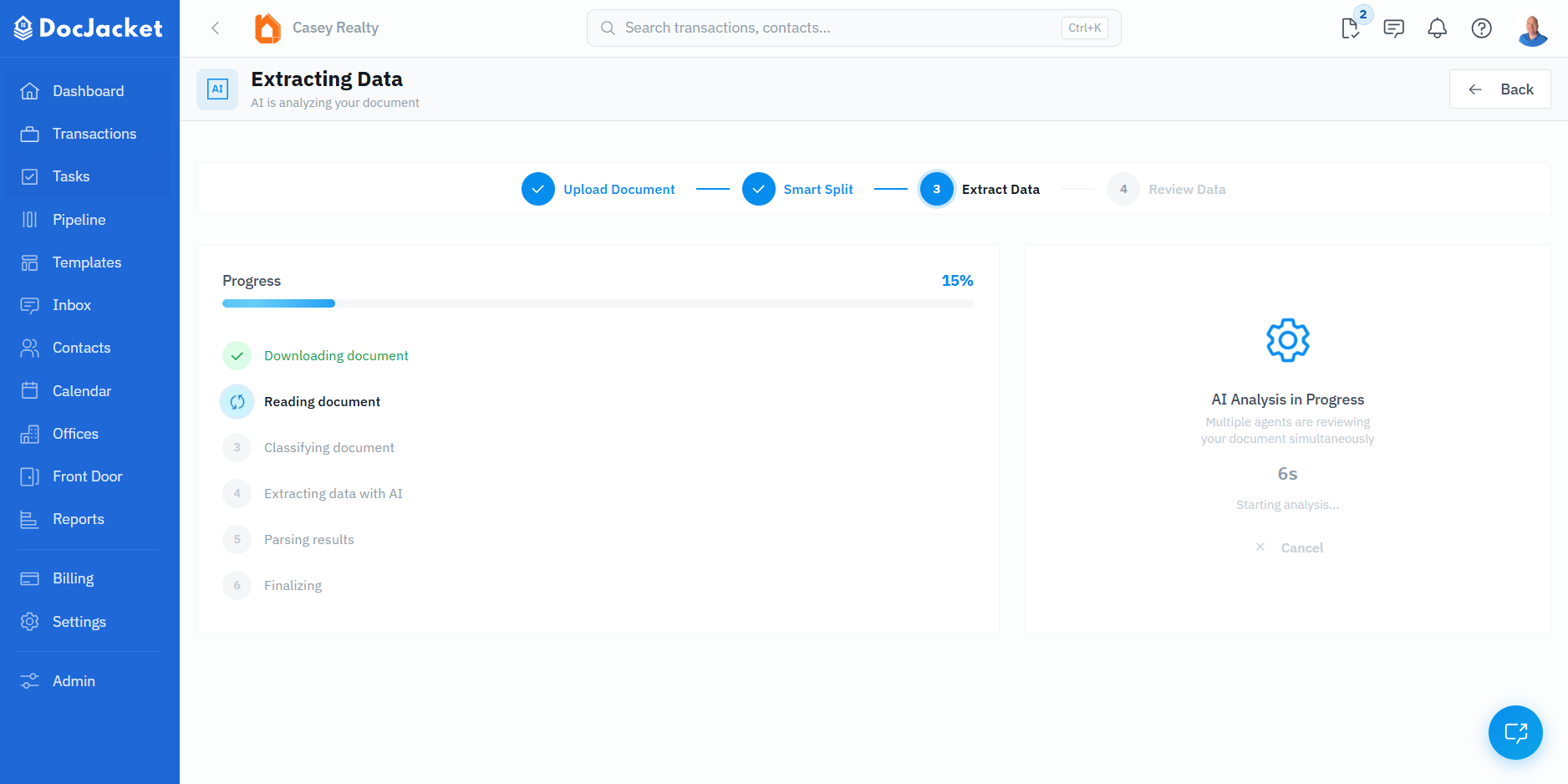
When a signed contract lands in DocJacket, AI reads it and pulls the data — property address, parties, closing date, earnest money, contingency dates, financing terms — directly into the transaction. You review, approve, and you’re done. 30–45 seconds.
Open To Close doesn’t extract contract data. You upload the PDF, then manually retype every field into the transaction record. Across 20 transactions a month, that’s hours of typing the same data twice — once on the contract, once into your TC software.
DocJacket’s extraction also learns. Every time you correct a field, that correction feeds back into a state-specific accuracy cache. Texas contracts get smarter over time. So do California, Florida, and every state you work in. The longer you use it, the less manual cleanup you do.
One Tool, Contract to Close to Archive
OTC has the pieces, but they’re spread across tiers. Intake forms require Pro at $199/month [^1][^3]. Smart Blocks for dynamic templates, also Pro. Triggered automations and conditional task logic, Scale only at $399/month. If you want the full workflow, you’re in the higher tier.
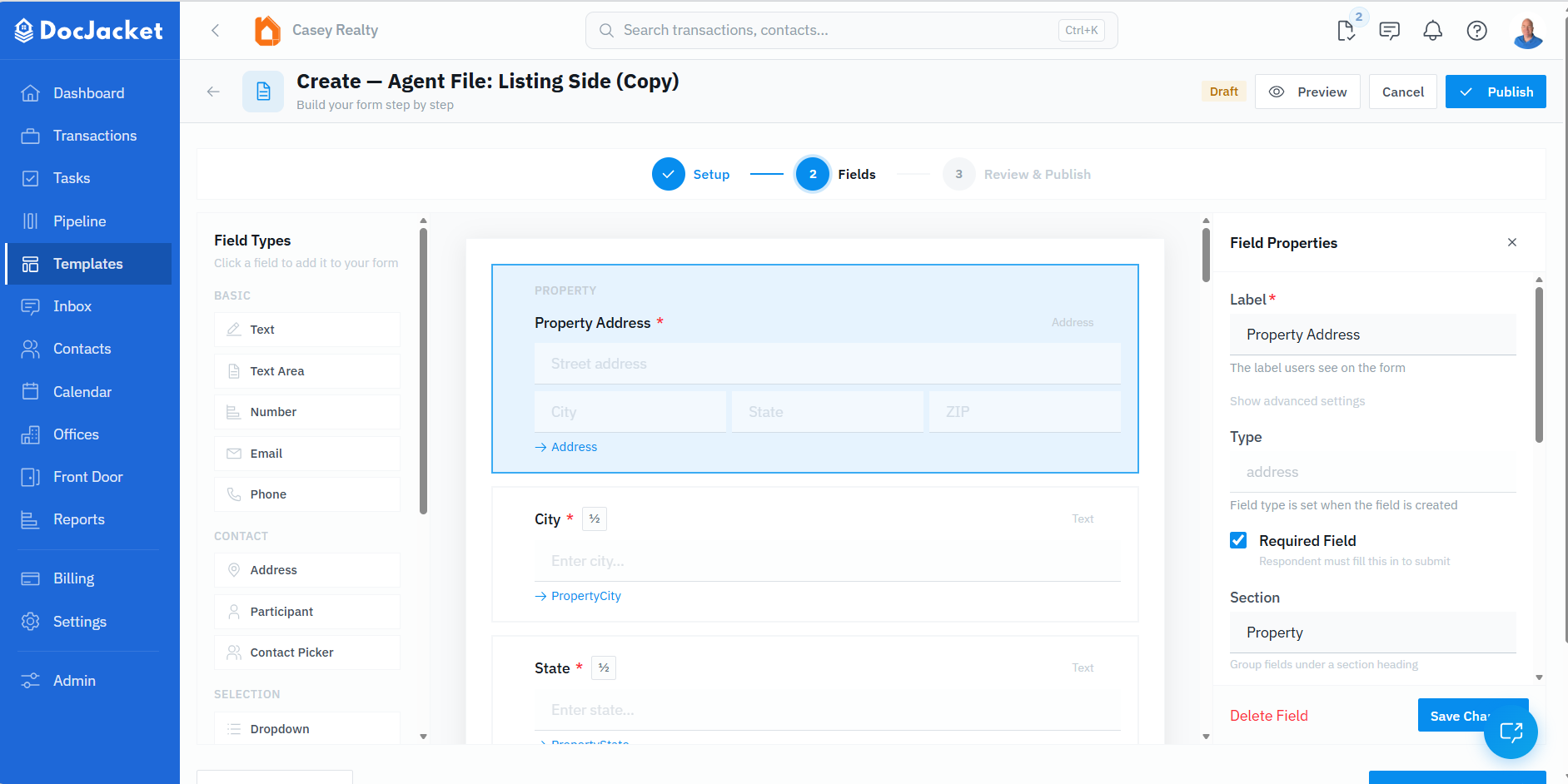
DocJacket runs the full workflow in one tool, on every plan: branded intake form → AI extraction → BYOF auto-filled contract → e-sign → timeline cascade → compliance packet export. One login. One data model.
Setup You Finish Today
The most common OTC complaint isn’t the product — it’s getting started. Competitor analyses and user reviews consistently describe 2–4 weeks of multi-session setup with deep customization before the system pays off [^6]. OTC’s onboarding leans heavily on help-center videos and articles; live demos exist but typically have to be requested.
DocJacket’s defaults work out of the box. Live onboarding when you want it. You’re running real transactions the day you sign up — not three weeks later.
BYOF With AI Field Mapping
Upload your state association forms (the ones you’re already licensed for through your MLS or association membership). DocJacket’s AI maps the fields automatically. Your intake data flows into the form. Send for e-sign. Done.
OTC supports document upload but doesn’t publicly document any equivalent — no PDF field auto-fill from intake or transaction data appears in their feature list or help center. That extra retyping step compounds across hundreds of transactions a year.
Reporting (and the SitRep vs. One Sheet)
Two kinds of reports matter to TCs: portfolio reports (how’s the business) and per-transaction status reports (what’s the deal status this week).
DocJacket includes both on every plan. Portfolio side: production reports, agent performance scores, deal velocity tracking. Per-transaction side: the SitRep Report — a one-page PDF showing status, missing documents, completed tasks, upcoming deadlines, and notes for any transaction. Send it to your agent, your broker, or save it for the file.
OTC’s equivalent is called the One Sheet — same idea, scheduled however you want (daily, weekly, monthly) [^11]. The catch is the tier limits: Grow ($99) caps you at 1 total report. Pro ($199) gives you 3. Unlimited reports require Scale at $399/month [^1]. If you want a SitRep-style email per transaction, per agent, or per broker, you’re on the Scale plan.
DocJacket has no per-tier report limit. One price, all reports.
What Neither Platform Has (Yet)
Honest disclosures:
- Native e-signature. Both rely on integrations (DocuSign, Dotloop, your existing tool) for now.
- Direct MLS integration. Neither pulls listings from 100+ MLS systems automatically. If you need that, you’re looking at SkySlope or Dotloop — with the cost and complexity that comes with them.
- Native mobile app for DocJacket. OTC has one. DocJacket doesn’t yet.
- Public API for DocJacket. OTC has one. DocJacket doesn’t yet.
Who Is Each Platform Built For?
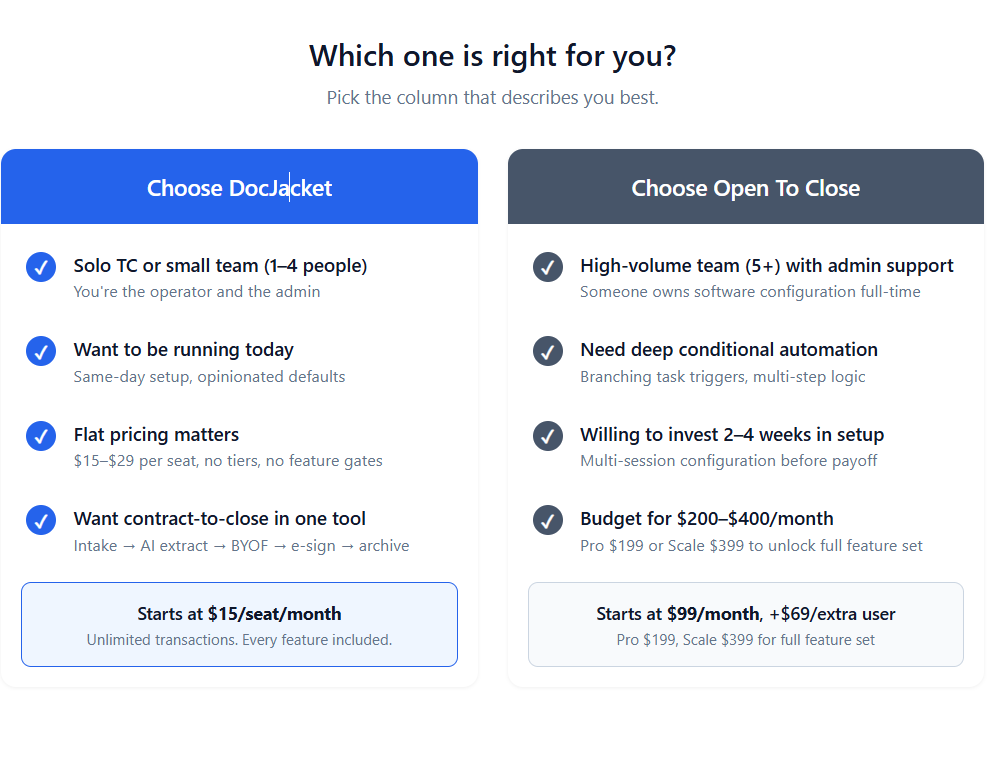
DocJacket is built for independent TCs and small TC teams who want predictable pricing, contract-to-close in one tool, and to be running today. The product is shaped around the operator who is the admin — no IT support, no Zapier specialist, no two-week setup committee.
Open To Close is built for high-volume teams and tech-forward agents who have admin bandwidth and need deep conditional workflow automation. If your operation is complex enough to justify weeks of setup and $200–$400/month, OTC’s depth pays off.
If you’re somewhere in the middle, the real question is which constraint matters more to you: workflow flexibility (OTC) or operational simplicity (DocJacket).
Try Both — Here’s How
Both platforms offer real trials, so test them with your own contracts before committing.
Try DocJacket free → — 2 active transactions, AI extraction included, up to 5 team members. No credit card required.
Try Open To Close free → — 15 transactions or 30 days, whichever ends first.
Run the same contract through both. Notice which one feels like a tool you’d reach for at 4pm on a Friday.
Frequently Asked Questions
Is DocJacket or Open To Close cheaper?
DocJacket, by a wide margin. Solo TCs pay $29/month vs OTC’s $99 base. Add users and the gap widens — OTC charges $69 per extra user; DocJacket stays flat. OTC’s higher tiers (Pro $199, Scale $399) widen it further.
Does Open To Close have built-in intake forms?
Yes, but they require the Pro plan at $199/month [^1][^3]. The Grow plan at $99 doesn’t include intake forms. DocJacket includes branded intake forms on every plan, starting at $29.
Can I switch from Open To Close to DocJacket?
Yes. Both work with standard real estate contracts. Active transactions can be recreated by uploading the contract to DocJacket — AI extracts the details fresh. There’s no data lock-in. Transaction history won’t transfer automatically, but new files are quick to set up.
Which has better workflow automation?
Open To Close, today. Their conditional triggers and custom field automation engine is the deepest in the category. DocJacket prioritizes opinionated defaults — most users don’t need OTC’s depth, and the setup tax is real.
Does either replace Dotloop or SkySlope?
Not entirely. Dotloop and SkySlope are primarily e-signature and broker-compliance platforms tied to brokerage workflows. DocJacket and OTC are transaction coordination platforms — they manage tasks, communication, and deadlines around those documents. Most TCs use a coordination platform alongside their brokerage’s e-sign tool.
Does Open To Close have a mobile app?
Yes — iOS and Android. DocJacket is web-based today and fully responsive in mobile browsers, but there’s no native app yet.
How long does Open To Close take to set up?
Realistically: weeks to fully configure for most teams. The product is powerful but not plug-and-play. User reviews consistently mention multiple setup sessions and deep customization before the system pays off. DocJacket is same-day.
Does Open To Close extract data from contracts automatically?
No. OTC requires you to manually enter contract data into each transaction record. DocJacket reads the contract with AI and pulls property details, parties, dates, and money fields directly into the transaction — you review and approve. Across hundreds of transactions a year, the time difference is significant.
Does Open To Close have native SMS?
Yes. OTC has Twilio-backed SMS with text triggers and Smart Blocks for SMS templates [^4][^5]. Each user gets 250 inbound + outbound texts per month included; additional texts cost +$5 per 250 [^1]. DocJacket includes SMS on every plan with no per-text overage cap.
References
All Open To Close claims in this article were verified against primary sources in May 2026. Pricing and feature gating may change — check OTC’s pricing page for the current state.
[^1]: Open To Close pricing page — plan tiers, per-user pricing, feature gating, text limits, report limits, free trial structure. https://opentoclose.com/v2/pricing
[^2]: ListedKit’s Open To Close comparison (2026) — confirms OTC has no native AI extraction. https://listedkit.com/comparisons/open-to-close-alternative/
[^3]: Open To Close Intake Forms feature page — describes native conditional intake forms. https://opentoclose.com/forms
[^4]: Open To Close SMS/Twilio Registration help article — confirms native SMS via Twilio. https://intercom.help/open-to-close/en/articles/8314167-sms-twilio-registration-form
[^5]: Open To Close Email Template help article and Smart Blocks documentation. https://intercom.help/open-to-close/en/articles/6060425-how-to-create-or-edit-an-email-template
[^6]: Multi-source confirmation of 2–4 week setup timeline: ListedKit comparison, Paperless Pipeline alternative analysis, AgentsGather April 2026 review. https://listedkit.com/comparisons/open-to-close-alternative/, https://www.paperlesspipeline.com/blog/is-paperless-pipeline-a-good-open-to-close-alternative-discover-which-real-estate-transaction-platform-fits-your-team-best
[^7]: Open To Close integrations page — full list of native integrations. https://opentoclose.com/integrations
[^8]: Open To Close iOS app (App Store) and Android app (Google Play) — confirms availability and limited feature set vs. web. https://apps.apple.com/us/app/open-to-close-inc/id1554004249
[^9]: Open To Close API documentation. https://docs.opentoclose.com/
[^10]: Open To Close Account Settings FAQ — confirms 15 transactions or 30 days, whichever first. https://intercom.help/open-to-close/en/articles/8260949-account-settings-faqs
[^11]: Open To Close Automation page — One-Sheets feature description. https://opentoclose.com/automation